 Amber Naz
Quick Summary
If you are thinking about selling online, you have probably heard that you can “just use Shopify.” That advice skips the part a beginner actually needs: what Shopify is, what it does for you, what you still have to do yourself, and what it costs. This guide explains how Shopify works in plain English, from the moment you sign up to the moment a customer’s money reaches your bank account.
It draws on Shopify’s own pricing page, help center and company pages, plus Infinite Commerce’s page about itself. Every price and figure comes from those pages, checked on 2026-10-14, and prices change often, so confirm them before you decide. The article does not promise sales or profit, because those depend on your product, your market and your marketing, not on the platform alone.
Quick answer
Shopify is a hosted ecommerce platform. Shopify handles the heavy lifting of running an online store for a monthly subscription, managing everything from website hosting and secure checkout to order management, payments, and shipping. This leaves you free to focus on adding your products, choosing a design, connecting your domain and payment method, and starting your sales, while also allowing you to easily extend the store with additional apps and themes as your business grows.
In one sentence: Shopify gives you the store and the machinery, and you bring the products, the brand and the customers.
What Shopify is and what it is not
Shopify’s own help center describes setting up your business on Shopify as something you can do whether you are starting a new business or moving an existing one, with step-by-step setup guides, a free trial and a printable setup checklist. In practical terms, Shopify is software you rent, not software you install and host yourself. That is why people call it “hosted.”
What that means for you:
- You do not manage servers. Shopify handles the hosting of your store.
- You do not write checkout code. Checkout is built in.
- You do not get the product. Shopify does not supply your inventory unless you connect a supplier or app yourself.
- You do not get customers automatically. You still need to bring traffic through search, social media, ads, email or other channels.
Think of Shopify as renting a fully equipped shop in a managed shopping center. The building, the tills and the security are provided. What goes on the shelves and how many people walk in are up to you.
How many merchants use Shopify?
This is a common question, and the honest answer is that the exact number is not published on the Shopify pages checked for this article. Shopify’s about page says “Millions trust Shopify to power their business,” and states “$1 trillion+” in sales made by businesses on Shopify, with “675+ million” unique shoppers buying from Shopify stores in 2023 and 10% of US ecommerce sales processed through Shopify. Its investor page, per the latest results listed there (Q2 2026, announced August 5, 2026), refers to “millions” of merchants in 175+ countries and a cumulative total of $1.6 trillion in gross merchandise volume, with no exact merchant count. The two pages give different cumulative sales figures and do not give the same date, so treat them as rough scale, not precise numbers.
Many websites publish exact store counts. Most of those come from third-party estimates, which use different methods and often cannot tell an active store from an abandoned one. If you quote a number, quote Shopify’s own wording, give the date and say where it came from.
The main parts of a Shopify store

1. The admin: your control room
When you sign up, you get an admin area where you run the business. From it you add products, process orders, manage customers, set up shipping and taxes, see reports and install apps. Everything behind the scenes happens here, while customers never see it.
2. The online store: what customers see
The online store is the website shoppers visit. Its look comes from a theme. According to Shopify’s help center, themes give your store a distinct look, layout and experience suited to the products you sell, and you can customize them to fit your brand. The Theme Store offers free and paid themes. A default theme is set up when you open an account, and you can add a free theme from the admin or buy a paid one from the Theme Store, and you can try a paid theme in your store before buying it.
3. Products and collections
You add products one at a time, or in bulk, with titles, descriptions, photos, prices and variants such as size or color. You can group products into collections, such as “Summer dresses” or “Gifts under $30,” so shoppers can browse. Shopify describes the first steps as adding your first product, choosing a theme and setting up a domain.
4. The cart and checkout
When a shopper adds an item and clicks to pay, Shopify’s checkout takes over. It collects contact and shipping details, shows shipping and tax amounts, takes payment and creates the order. This is the part of a store that is hardest to build safely yourself, and it is built into Shopify. Standard branding options are available on the Basic plan and higher, while advanced checkout customization is limited to the Plus plan, according to Shopify’s help pages.
5. Payments
Shopify Payments is Shopify’s built-in payment option. Per Shopify’s help center, you do not need to set up a separate payment provider or merchant account, and stores are set up to accept major payment methods when the store is created. Setup involves enabling card payments, adding bank details and configuring fraud alerts and payout notifications, and test mode lets you try payments before going live. Shopify requires two-step authentication on the account.
Two catches matter for beginners. First, Shopify Payments is available only to online stores in certain countries and regions, so check yours before you plan around it. Second, if you use a different payment provider alongside it, transaction fees apply, as explained in the costs section below.
6. Shipping and taxes
You set shipping rates in the admin, such as flat rates, free shipping or rates calculated by carriers, and you decide where you ship. Shopify also lets you buy discounted shipping labels from supported carriers, with discount levels depending on your plan and location. Tax settings let you show prices with or without tax depending on where customers shop. The rules for collecting tax vary by country and region, so confirm what applies to you with a qualified tax professional.
7. Your domain
Your store starts with a Shopify web address, and you can set up your own domain. Shopify says you can buy a new domain through Shopify, buy one from a third-party provider and connect it, or transfer an existing one, then make it your primary domain.
8. Apps
Apps add features that are not built in, such as email marketing, reviews, subscriptions, tracking and more. Per Shopify, apps add features to your admin, help you grow your business and connect your store to external services, and most are built by third-party developers, not by Shopify. You find them in the Shopify App Store. Apps often have their own monthly prices, billed separately from your Shopify plan, so add them to your cost estimate.
Infinite Commerce, the company behind this blog, is one example. Its about page describes it as a certified Shopify partner that builds Shopify apps and themes, and lists apps for Google Ads tracking and Tag Manager, Facebook and TikTok pixels, Microsoft Clarity and heatmaps, product feeds for Facebook, TikTok and Microsoft, and Google reviews. Apps like these cover jobs Shopify leaves to third parties, such as ad tracking and product feeds.
How a sale happens, step by step
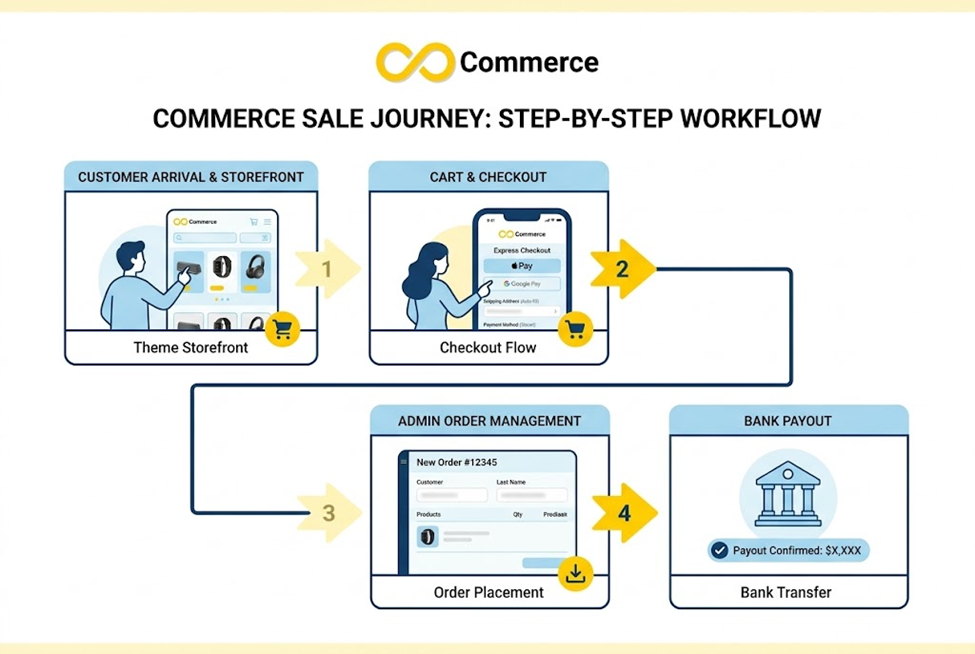
Here is the journey of a single order.
- A shopper finds your store through search, social media, an ad, email or a link.
- They browse your products on the storefront, which uses your theme.
- They add an item to the cart and begin checkout.
- They enter contact and shipping details, choose a shipping option and pay.
- Shopify creates the order and shows it in your admin. The customer typically gets a confirmation.
- You fulfil the order: pack it, buy a shipping label and hand it to the carrier, or pass it to a supplier or fulfillment service.
- The customer receives tracking details, and the order is marked fulfilled.
- The payment is paid out to your bank account according to your payment provider’s schedule. Shopify’s payments page says payout details are covered in its Getting paid section.
Your work is in steps 1 and 6: getting people to the store and getting the product to them. Shopify handles most of what happens in between.
What it costs
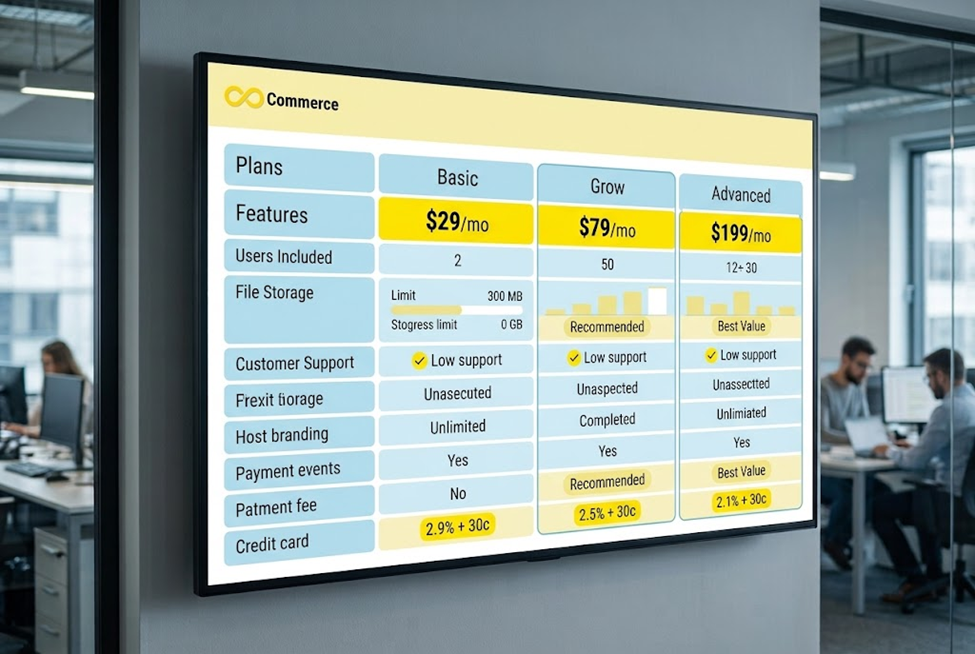
Shopify’s pricing page lists these plans in US dollars:
| Plan | Yearly billing | Monthly billing | Online card rate | Third-party transaction fee |
| Basic | $29/mo | $39/mo | 2.9% + 30¢ | 2% |
| Grow | $79/mo | $105/mo | 2.7% + 30¢ | 1% |
| Advanced | $299/mo | $399/mo | 2.5% + 30¢ | 0.6% |
| Plus | From $2,300/mo | n/a | 2.25% + 30¢ | 0.2% |
The page also lists a free trial of 3 days, then $1 a month for the first 3 months on most plans, and says the trial needs no credit card. It states that there are no setup fees on any plan and that monthly plans can be cancelled at any time. Higher plans include more staff accounts and extras, such as discounted shipping and live third-party shipping rates on Advanced. Check the page for the current list, because offers change.
The costs people forget
- Payment processing fees. Every card payment has a percentage and a fixed fee, shown above.
- Third-party transaction fees. Shopify’s payments page says no third-party transaction fees apply to orders processed through Shopify Payments, Shop Pay or Shop Pay Installments, but transaction fees apply when you use a third-party provider alongside Shopify Payments.
- Apps. Many have monthly charges.
- Themes. Free themes exist, and paid themes cost extra.
- Domain. A custom domain has its own cost.
- Shipping. Labels and packaging are real expenses, even with discounts.
- Marketing. Traffic does not come free.
- Your time. Product photography, descriptions and customer support take hours.
Add these to the plan price to get your true monthly cost.
What you need to start
A practical beginner checklist:
- A product or product idea, and a plan for where it comes from: you make it, buy it, or use a supplier.
- Product photos and descriptions. Clear photos and honest descriptions help sell.
- A bank account for payouts, and the identity details Shopify’s payment setup asks for.
- An idea of your shipping costs and policies. Decide where you ship, how much it costs and your returns policy.
- Store policies. Shopify’s checkout settings include refund, privacy and terms of service policies.
- Time and willingness to learn. Shopify is designed to be approachable, but running a store is real work.
You do not need to know how to code to open a store.
A beginner’s setup path

- Sign up and use the free trial to explore.
- Add your first products with good photos and clear descriptions.
- Choose a theme and customize the look to fit your brand.
- Set up your domain, either through Shopify or a third-party provider.
- Set up payments, with Shopify Payments if it is available where you are, or another provider.
- Set shipping and taxes, and write your store policies.
- Place a test order to check checkout, payment and emails.
- Pick your plan before the trial ends and launch.
- Add apps only when you need them, and track what each one costs.
Shopify’s own pages say the main early tasks are to add your first product, choose a theme and set up a domain, with further steps in its guides.
The strengths and limits
Strengths
- A store that is ready to use without technical work.
- Built-in checkout and payments.
- A large selection of themes and apps.
- Options to grow, from small stores to higher plans.
Limits
- Monthly costs add up once you include apps and fees.
- Checkout customization is limited on lower plans, per Shopify’s help pages.
- Payments depend on your country, since Shopify Payments is available only in certain countries and regions.
- You still have to bring traffic. A store with no visitors makes no sales.
- App dependence. Some features rely on third-party apps with their own pricing and quality.
Who Shopify suits
Shopify is a reasonable fit if you want to sell physical or digital products online, you want a ready-made store instead of building one, and you are willing to pay a monthly fee for that convenience. It may be less suitable if you only want a simple brochure website, if your country does not support the payment setup you need, or if you need a very unusual custom experience that is costly to build on any hosted platform. It is worth comparing alternatives before you commit.
Tracking and measuring your store
Once your store is live, you will want to know where visitors come from and which ads or posts lead to sales. That means setting up tracking, such as the pixels that ad platforms use to learn from your purchases. Apps handle much of this on Shopify, so you do not need to edit code. If you plan to advertise on Facebook, our guide to Shopify and Facebook integration with Meta Pixel shows how the connection works. It is worth planning early, because tracking mistakes make your reports and ad results unreliable.
Common beginner mistakes
- Assuming Shopify brings customers. It gives you a store, not an audience.
- Ignoring total costs. Plan price is only one part.
- Installing too many apps. Each adds cost and complexity.
- Skipping test orders. Test checkout, payment and emails before launch.
- Copying supplier descriptions word for word. Write your own.
- Forgetting policies. Shoppers look for shipping and returns information.
- Quoting unverified statistics. Check the source and date of any figure.
Final thoughts
Shopify works by taking on the technical parts of running an online store, so you can focus on products, brand and customers. It is not magic and it is not free, but for many beginners it is a practical way to open a store without hiring developers. Start with the trial, add your first products, test the whole journey as a customer, and add tools only when you can name the problem they solve.
Learn more about the team behind this blog
Infinite Commerce builds Shopify apps for tracking, pixels, product feeds and heatmaps. You can read more about the company on its about page, explore its apps, or contact our team if you want help planning your tracking and product data for a new Shopify store.
FAQs
You pay a monthly subscription for a hosted store. You add products, choose a theme, set up a domain, payments and shipping, and launch. Shopify provides the website, checkout and admin, and you provide the products and the customers.
No. Shopify offers a free trial, listed on its pricing page as 3 days free and then $1 a month for 3 months on most plans, after which a paid plan applies. Payment fees, apps, themes and domains can add costs.
No. You can set up a store using the admin and a theme editor. Coding becomes useful only for deeper customization.
Shopify’s pricing page shows that it charges monthly plan fees and payment processing fees on its plans. It also lists add-ons such as POS Pro. Its investor page refers to revenue growth but does not break down the sources.
Customer payments go through your payment provider, such as Shopify Payments, and are paid out to your bank account. Shopify says payout details are covered in its Getting paid section, and timing depends on your setup.
Shopify’s pages checked for this article say “millions” of merchants and do not give an exact number. Third-party figures vary and should be treated cautiously.
Yes. You can buy a domain through Shopify, connect one from another provider or transfer an existing domain.
