 Amber Naz
Summary
Turning a Shopify store into a mobile app sounds like one decision, but it is really a choice between several very different routes. Some take an afternoon and a monthly subscription. Others take a development team and months of work. A few do not involve building an app at all. Picking the wrong one is the usual way merchants waste money here.
This guide explains the main options for a Shopify store to app project, what each one involves, the fixed costs that apply to any app you publish, the store rules you need to pass, and a step-by-step process for getting from idea to launch. It draws on Shopify’s developer and help documentation, Apple’s and Google’s developer pages, and Google’s PWA guidance. Where a figure comes from a vendor, the article says so, and it does not quote prices for builder apps or agencies, because those vary and change. Get current quotes before you commit.
Quick answer
There are five realistic routes:
- Do nothing new and use the Shop app. Eligible Shopify stores are listed in Shopify’s own Shop app automatically.
- Make your mobile site installable (a progressive web app). Cheapest and fastest, but it is not an App Store listing.
- Use a no-code app builder. A Shopify app that wraps your store in a native-style app, with a subscription.
- Build a custom native or React Native app on Shopify’s Storefront API and Checkout Kit. Most control, highest cost.
- Go headless on the web with Hydrogen. Strictly a web storefront, but worth knowing about because it is often confused with a mobile app.
Most small and mid-sized stores should check whether a well-optimized mobile site already does the job before paying for an app. An app earns its place when you have repeat buyers, a need for push notifications or loyalty features, or a customer experience a mobile browser cannot give you.
Do you actually need a mobile app?
Before choosing a route, ask what problem the app solves. A mobile-optimized Shopify theme already works on every phone with no download. An app asks the shopper to find it in a store, install it and give it space on their home screen. That is a high bar for a first-time buyer.
Apps tend to make sense when:
- You have repeat customers who would open it regularly.
- You want direct channels such as push notifications.
- Your brand has a community, a loyalty program or content that benefits from a dedicated space.
- You need device features such as the camera or biometric sign-in.
They make less sense when most of your sales come from first-time visitors arriving from search or social ads. Those shoppers will not install an app to buy one item. For them, your mobile site and checkout are what matter.
A useful test: can you name the specific behavior you expect the app to change, such as more repeat purchases, and how you will measure it? If not, start with the mobile site.
Option 1: Let the Shop app list your store
Shopify’s own Shop app is not your app, but it is worth knowing about because it costs you nothing extra to be there. According to Shopify’s help documentation, Shop is a shopping destination and delivery tracking app available on iOS, Android and the web. Eligible stores and products are listed in Shop automatically, and the Shop sales channel appears in your Shopify admin.
What it gives you:
- Exposure to shoppers who use Shop to discover stores and products.
- A way for customers to track packages, and for you to offer Track with Shop from your order status page.
- Posts and post-purchase offers to stay in touch with customers on Shop.
- Shop Pay, which Shopify describes as part of the Shop experience.
What it does not give you: your own branded icon, your own listing, or full control of the experience. It is a channel, not a replacement for your own app. Your store must meet the Shop Merchant Guidelines, Shop is available in countries where Shopify Payments is supported, and Shopify Network Intelligence must be enabled in your privacy settings. Check your admin to see if the channel is available to you.
Option 2: A progressive web app (PWA)
A progressive web app is a website that can be installed on a phone and behaves more like an app. Google’s web.dev guidance describes PWAs as built and enhanced with modern APIs to deliver added capabilities, reliability and installability, reaching users on any device from a single codebase. Installing one creates a standalone experience without browser chrome around the content. Two technical parts matter: a service worker, which enables fast loading, offline access and push notifications, and a web app manifest, a JSON file that defines how the PWA is treated as an installed application.
Pros: one codebase, no App Store review, and no per-platform developer fees.
Cons: it is not listed in the App Store or Google Play, so shoppers do not find it there. What a PWA can do varies by browser and operating system, so verify the features you need (such as push notifications) on the devices your customers use.
On Shopify, whether you can build a PWA on a standard theme, or need a custom storefront or an app that provides it, depends on your setup. This article found no single Shopify page that documents one official route, so ask any provider exactly how their PWA works with your theme, your apps and your checkout.
Option 3: No-code app builders

The most common answer to “how do I turn my Shopify store into an app?” is a mobile app builder from the Shopify App Store. These apps typically connect to your store’s catalog and let you configure screens, branding and navigation, then publish a native-style app for iOS and Android.
The Shopify App Store search results would not load while this article was researched, so it names no specific builders and quotes no prices. Compare options directly in the App Store, and use the questions below to separate them.
What to ask a builder
- Do I publish under my own developer account, or yours? Publishing under your account gives you control of the listing and customer reviews. Publishing under the vendor’s makes moving later harder.
- Is it a true native app or a wrapped website? This matters for Apple’s rules (see below) and for how smooth the app feels.
- How does checkout work? The best answer keeps Shopify’s own checkout, so your payment methods, taxes and discounts behave as they do on the web.
- Which of my apps and features are supported? Reviews, subscriptions, loyalty and search apps do not always carry over to an app automatically.
- What does support look like when a store review fails or an OS update breaks something?
- What happens if I leave? Check whether you can keep your app listing, your push subscribers and your data.
- What are all the costs? Ask for monthly fees, setup fees, per-notification charges and any traffic or revenue tiers.
Pros and cons
Pros: much faster and cheaper than custom development, no engineers needed, and updates to your catalog usually flow through automatically.
Cons: less design freedom, dependence on the vendor’s roadmap, and your app is only as good as the builder’s templates.
Option 4: A custom native or React Native app
If you need a bespoke experience, you build the app yourself or hire a developer or agency. Shopify documents the building blocks in its mobile developer docs.
The Storefront API lets your app browse products and collections, search the catalog, and create and manage carts. Shopify’s page describes mobile storefronts built with the Storefront API for iOS, Android and React Native.
Checkout Kit presents Shopify’s checkout inside your app. According to Shopify’s documentation, it is an open-source SDK for Swift, Android and React Native. You pass it a checkoutUrl, which comes from a cart creation mutation or a cart permalink, and it presents the same checkout buyers see on the web. Shopify processes payments, applies tax and regulatory rules, and creates the order. The page lists these minimum versions: iOS 13.0 with Swift 5.7, Android SDK 23 with JDK 17, and React Native 0.70.
Checkout Kit supports branding, including your store’s custom branding from the admin, and the page says it accepts all configured payment providers, including Shop Pay and Apple Pay. The page also states that checkout UI extensions and checkout branding require Shopify Plus.
Accelerated checkouts are another part of Shopify’s mobile documentation. They add Shop Pay and Apple Pay buttons on product and cart pages so buyers can pay without opening the full checkout.
Pros: full control of design and features, your own developer account, and the ability to build things no template offers.
Cons: the highest cost, a longer timeline, and ongoing maintenance as iOS, Android and your own store change. You also need people who can build and support it. For a small store, the cost is usually hard to justify unless the app is central to your strategy.
Option 5: Headless web storefront (not a mobile app)
You will see headless commerce mentioned alongside apps, so it is worth separating. Shopify’s headless documentation describes Hydrogen as a framework for headless commerce built on React Router, with Oxygen as its edge hosting platform. You can also use any framework or hosting with Shopify’s composable APIs.
A headless storefront gives you a custom website experience. It does not by itself put an icon on a customer’s phone. You may combine it with a mobile app that talks to the same APIs, but that is a large project. For most stores, headless is a way to rebuild the website, not a shortcut to an app.
Compare the options
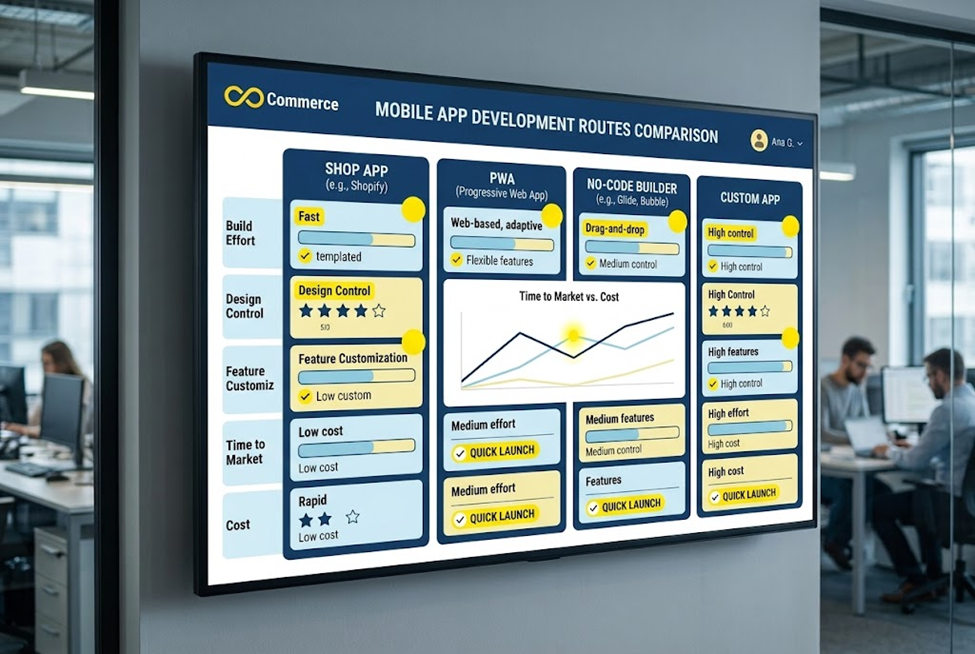
| Features | Shop app | PWA | No-code builder | Custom app |
| Your own App Store listing | No | No | Yes | Yes |
| Build effort | None | Low to medium | Low | High |
| Design control | None | Medium | Limited | Full |
| Ongoing work | None | Some | Some | Significant |
| Best for | Extra exposure | Testing demand cheaply | Most small stores that want an app | Brands with unique needs |
These are general characteristics, not quotes. Your results depend on the provider and your store.
Fixed costs and rules for publishing an app
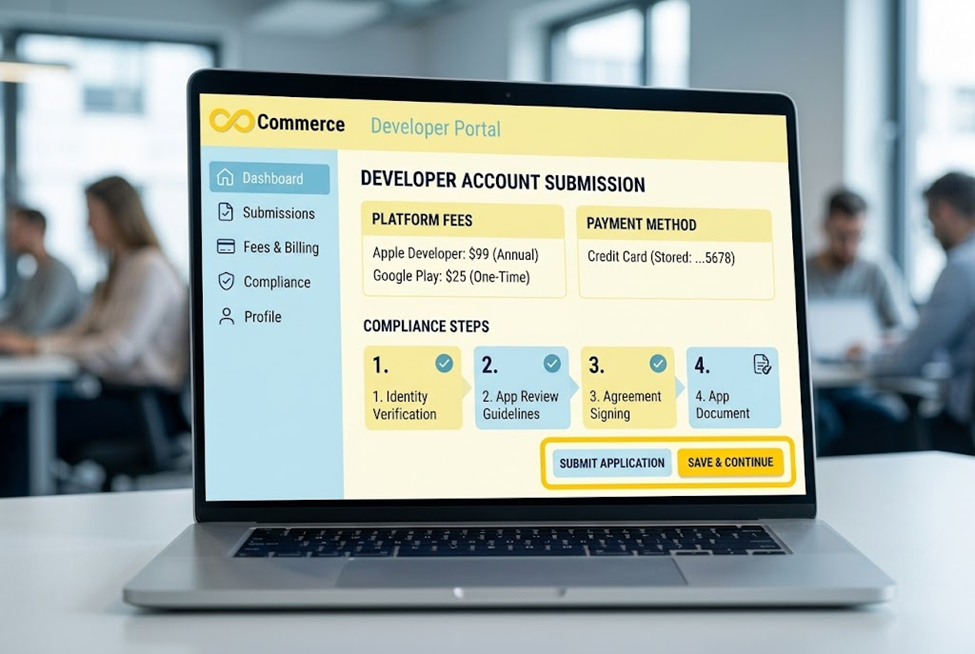
Whichever route you pick, if you publish to the stores you meet the platforms’ rules and fees.
Developer account fees
- Apple: the Apple Developer Program costs 99 USD per membership year, or the local equivalent, according to Apple’s membership page. Fee waivers may be available for nonprofits, educational institutions and government entities.
- Google Play: a one-time US$25 registration fee, per Google’s help page. You must be at least 18, accept the developer agreement and may be asked for a government ID and credit card in your legal name. Personal accounts created after November 13, 2023 have testing requirements before an app can go live.
These are the platform fees only. Builder subscriptions, development and design costs are separate.
Apple’s review guidelines
Apple’s App Store Review Guidelines matter a great deal for ecommerce apps. Three points stand out:
- Do not be a repackaged website. Guideline 4.2 says your app should include features, content and UI that elevate it beyond a repackaged website, and that an app that is not particularly useful, unique or “app-like” does not belong on the App Store. A thin wrapper around your mobile site is a common reason for rejection, so ask any builder how they handle this.
- Physical goods use normal payment methods. Guideline 3.1.3(e) says that if your app enables people to purchase physical goods or services consumed outside the app, you must use purchase methods other than in-app purchase, such as Apple Pay or traditional credit card entry. Digital unlocks within the app follow different rules, so check them if you sell digital products.
- Privacy is required. Section 5.1 says all apps must link to a privacy policy that explains what data is collected, how it is used and how users can revoke consent or request deletion, and that apps must secure user consent for data collection and only request access to data relevant to the app’s core functionality.
This article read only part of the guidelines page, so have whoever submits your app read the current full text before you submit.
How to turn your Shopify store into an app: a step-by-step process
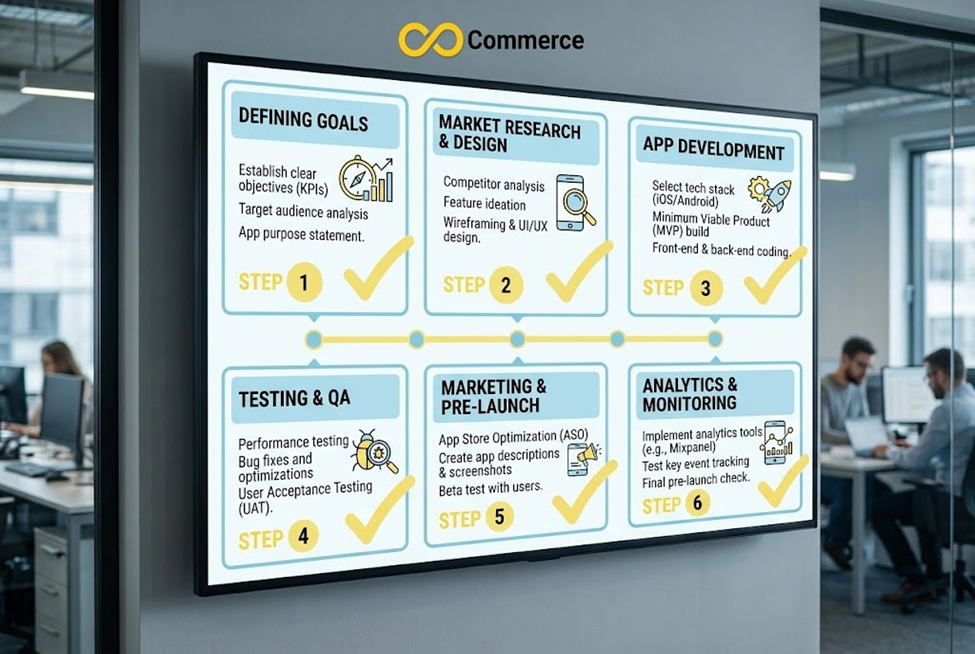
Step 1: Define the goal and the metric
Write one sentence: “We want an app so that [customer group] does [behavior], and we will measure it with [metric].” Repeat purchase rate, push-notification opt-ins and app revenue are examples.
Step 2: Fix your store first
An app inherits your store’s data. Clean product titles, images, variants, collections and shipping rules before you build, because they will show up in the app. If your catalog is messy, the app will be too.
Step 3: Choose your route
Use the comparison above. If you are unsure, start with the cheapest option that tests demand, and move up only if the numbers justify it.
Step 4: Set up your developer accounts
Create your Apple and Google developer accounts in your own business name, so you own the listings. Allow time for identity verification, because it can take longer than expected.
Step 5: Design for mobile behavior
An app is not a shrunken website. Put search, the cart and reorder or account access within easy reach. Keep the home screen focused on what returning customers want most.
Step 6: Keep checkout simple and tested
Use Shopify’s checkout wherever you can, so taxes, shipping, discounts and payment methods stay consistent. Test a full order on both iOS and Android, with each payment method you offer, before launch.
Step 7: Plan your tracking before launch
Decide which events you need, such as product views, add to cart, begin checkout and purchase, and confirm they are recorded for app orders as well as web orders. App analytics is usually set up differently from website tracking, so ask your builder or developer exactly how events reach your analytics and ad platforms, and test with a real order. Make sure consent and privacy settings are handled as the store rules require.
Step 8: Submit, launch and iterate
Prepare screenshots, descriptions, a privacy policy and test credentials for the reviewers. Expect that a submission may need changes. After launch, watch crash reports, reviews and your target metric, and release improvements on a regular schedule.
Common mistakes to avoid
- Building an app before fixing the mobile site. Most shoppers will meet your store in a browser first.
- Publishing under the vendor’s account. You may lose control of your listing.
- Launching a thin wrapper. This risks rejection under Apple’s guidelines.
- Ignoring tracking. If app orders do not reach your analytics or ad platforms, you cannot judge the app or optimize your ads.
- Forgetting maintenance. Phones update, stores change, and apps need attention long after launch.
- Over-promising push notifications. Shoppers can turn them off, so send messages that are useful.
Final thoughts
The best way to turn a Shopify store into an app is the simplest route that proves the idea. Check whether your mobile site and the Shop app already do enough, try a PWA or a no-code builder to test demand, and invest in custom development only if the app is clearly central to your business. Whatever you choose, own your developer accounts, keep Shopify’s checkout, follow Apple’s and Google’s rules, and make sure app orders are tracked.
Need help planning your tracking and product data?
Infinite Commerce’s site lists tracking, pixel and product feed apps and no mobile app service, so this is not an app-building pitch. If you want help with the tracking and product data that any app depends on, such as ad conversion tracking, pixels and feeds for your Shopify store, contact our team.
FAQs
Not completely. Being listed in the Shop app costs nothing extra for eligible stores, but your own app involves at least developer account fees, which are 99 USD a year for Apple and a one-time US$25 for Google Play, plus any builder subscription or development cost.
Not for a no-code builder. You would for a custom app built with the Storefront API and Checkout Kit, though you can hire a developer or agency to do it.
It can. Shopify’s Checkout Kit presents Shopify’s checkout inside a mobile app, and Shopify processes payments and creates the order. If you use a builder, ask how it handles checkout.
No. A progressive web app is a website that can be installed and behaves more like an app, but it is not listed in the App Store the way a native app is, and its capabilities vary by browser and device.
It is a risk. Apple’s guidelines say an app should offer features, content and UI beyond a repackaged website. Ask your provider how the app goes beyond a wrapped site.
It can, but there is no guarantee. Apps tend to help stores with repeat buyers and loyal customers. Set a measurable goal and track it.
