 Amber Naz
Summary
There is no single best shipping app for Shopify, because “shipping” covers several different jobs. One store needs cheaper labels. Another needs live carrier rates at checkout. A third needs to show duties and taxes for international buyers, or to stop customers emailing “where is my order?” Choosing by need, rather than by a ranked list, is the quickest way to avoid paying for features you will never use.
This guide compares a short list of Shopify shipping apps and Shopify’s own shipping tools against the jobs they do best. Every app detail comes from the app’s own Shopify App Store listing or from Shopify’s help pages, checked on 2026-10-14. Prices, ratings and review counts change, so treat them as a snapshot. Ratings come from merchants’ reviews on the App Store and show how an app is received; they do not prove it will fit your store. The article does not rank the apps, and nothing in it is sponsored.
Quick answer
| If you need | Look at |
| Discounted labels inside Shopify with no extra app | Shopify Shipping |
| Many channels, carriers and automation rules | ShipStation |
| Simple multi-carrier labels with a free tier | Shippo |
| International shipping, duties and taxes | Easyship |
| European carriers and delivery options | Sendcloud |
| Branded tracking pages and delivery notifications | AfterShip |
| Complex rates at checkout, freight or rules | ShipperHQ |
Start with Shopify’s built-in options. Add an app only when you can name a specific gap they leave.
First, know what Shopify already does
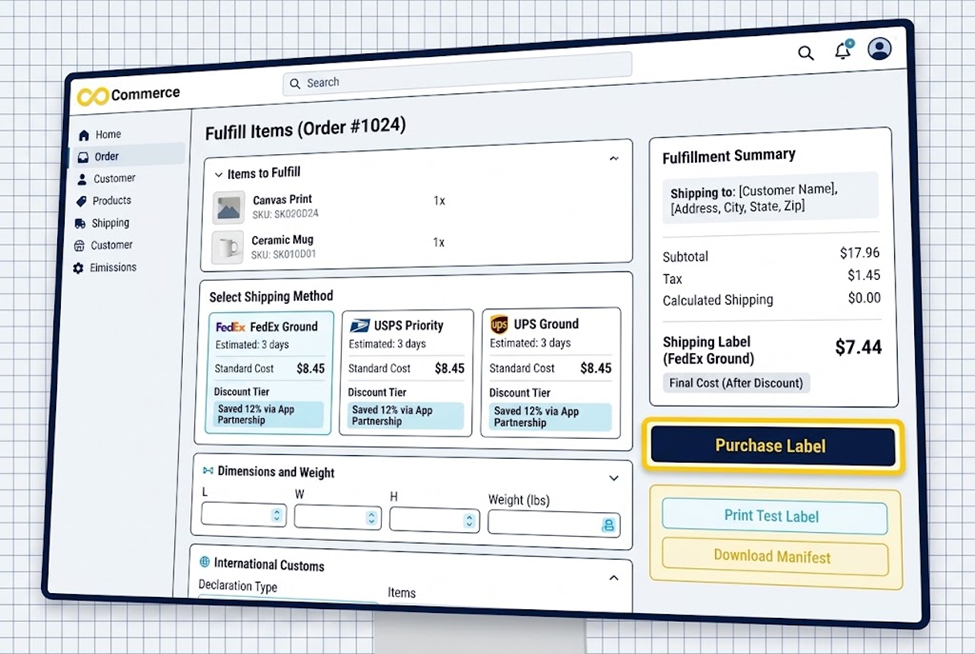
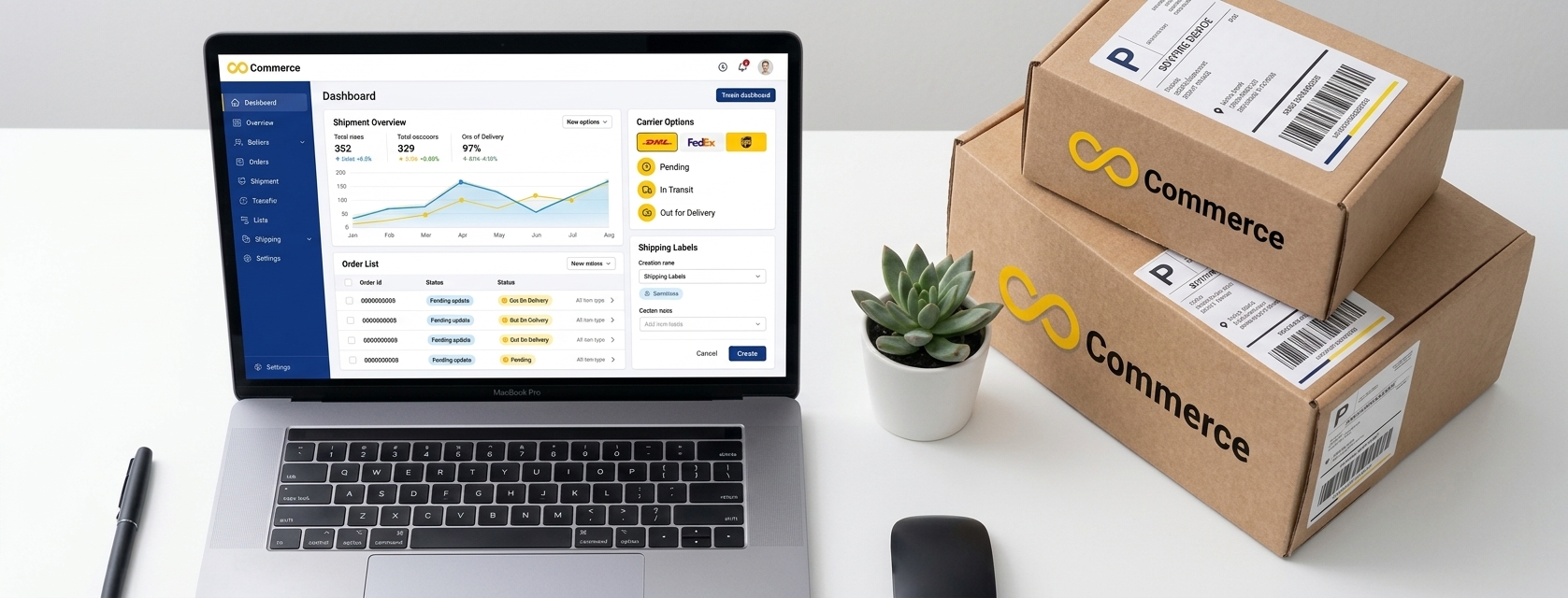
Before installing anything, check what your plan includes.
Shopify Shipping. According to Shopify’s help documentation, you can buy, print and reprint discounted labels from supported carriers in the Shopify admin, individually or in bulk while fulfilling orders. You can void unused labels for refunds, track deliveries and schedule carrier pickups. Discount levels depend on your Shopify plan, and eligibility varies by carrier and country. The page says return labels are available only if your default location is in the United States, and that shipping insurance and claims are available for shipments from the United States. Labels provide tracking information to customers automatically. You need an eligible fulfillment location and a desktop printer or a supported label printer.
Carrier-calculated rates. If you want live rates from your own carrier account at checkout, Shopify’s page says third-party carrier-calculated shipping is available on Shopify Advanced and Plus, and that Grow stores can add it for an additional monthly fee or by switching to annual billing. It requests live rates from the carrier account you connect, based on each order’s weight, dimensions and destination. Shopify’s shipping rates page also lists flat rates, free shipping and carrier-calculated rates, and says backup rates help customers complete checkout when carrier-calculated rates fail.
What to check in your own store: which carriers you can use in your country, what label discounts your plan gets, and whether you already have all you need. Many small stores never need an app.
How to choose a shipping app
Ask these questions before you compare features:
- Where do you ship from and to? Carrier support and discounts depend on country.
- How many orders a month? Plans are often priced by shipments or labels.
- Do you sell on more than one channel? If so, you may want one place for all orders.
- Do you ship internationally? If yes, duties, taxes and customs forms matter.
- Do you need to control rates at checkout? That is a different job from printing labels.
- How much support do you want? Check what each plan includes.
- What is the total cost? Look for per-label fees, overage charges and add-ons that may be billed separately from your Shopify invoice.
Several listings note that external charges may be billed separately from the Shopify invoice, so read the billing section carefully.
Best for adding discounted labels and automation across channels: ShipStation
ShipStation describes itself as shipping, order and inventory management for multiple sales channels, warehouses and carriers, with automation for fulfillment workflows.
What its listing says it offers:
- Order and inventory sync across channels such as TikTok Shop, Amazon and Walmart.
- Discounted rates or your own accounts with 200+ carriers, including UPS, USPS and FedEx.
- Branded tracking pages and a self-service returns and exchanges portal.
- Automation rules to batch, tag and route orders, and bulk label printing.
Pricing (as listed): Starter $14.99 a month (3 users, unlimited store connections, automated rate shopping, return labels, basic automations), Standard $29.99 a month (10 users, unlimited automations, order combining and splitting, a Shipping API, phone support) and Premium $349.99 a month (15 users, inventory management, a dedicated account manager). The listing notes variable charges based on geography and monthly order volume may be billed separately, and each plan lists a 30-day free trial.
Reputation: 4.2 out of 5 from 706 reviews on the listing.
Best for: stores selling on several channels, or with warehouse workflows, that want automation and are comfortable paying for it.
Consider: the plan structure and possible extra charges mean you should calculate your real monthly cost.
Best for simple multi-carrier labels with a free tier: Shippo
Shippo brings orders from Shopify and other sales channels into one workspace and lists pre-negotiated rates across 40+ carriers.
Listed features include: label creation, bulk label printing, address validation, packing slips, customs documents, return labels, shipping insurance, shipping rules, order sync, real-time tracking and branded tracking pages.
Pricing (as listed): a Starter plan that is free for up to 30 labels a month, with automations, email support and 1 user. Professional starts at $19 a month for up to 10K labels a month, including connecting your own carrier accounts, branded shipping, chat and phone support and up to 5 user logins, with a 30-day free trial. The listing says pricing depends on label volume. External charges may be billed separately.
Reputation: 4.2 out of 5 from 318 reviews.
Best for: small stores that ship a modest number of parcels and want to start free.
Consider: the free tier is capped at 30 labels a month, so growing stores will move to a paid plan.
Best for international shipping, duties and taxes: Easyship
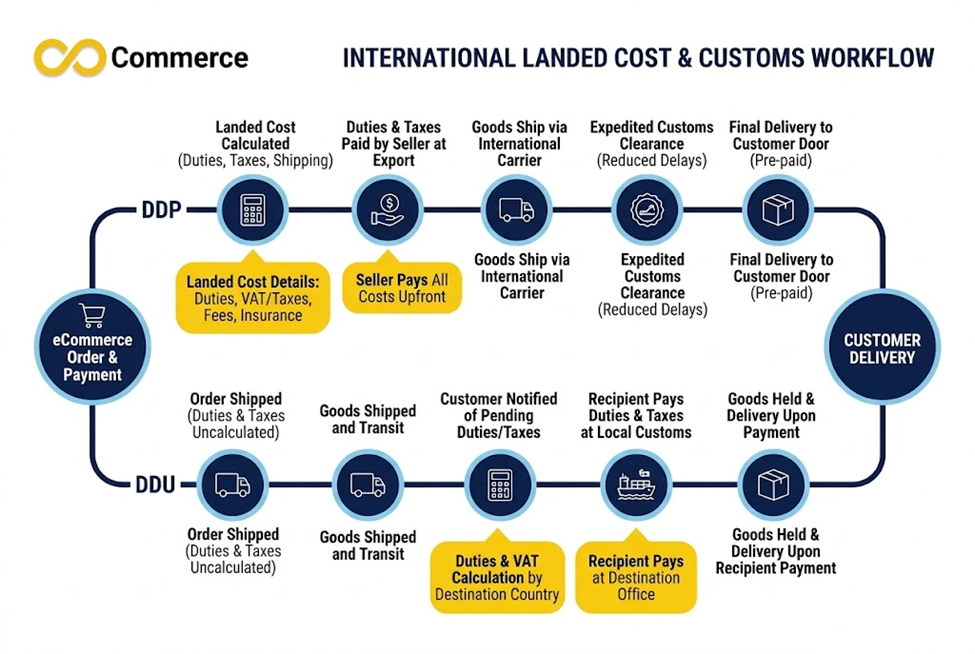
Easyship lists discounted rates on UPS, FedEx, DHL, USPS and others, and says it compares “550+ services across the US, Canada, UK, EU, Australia & Asia.” It also lists calculated rates, tax and duties at checkout, with DDP and DDU options.
DDP (delivered duty paid) means the seller collects duties and taxes upfront, so the buyer is not surprised on delivery. DDU (delivered duty unpaid) leaves them for the buyer to pay. Showing the full cost before payment can help reduce abandoned international orders. Shopify’s own pages make a related point: its tax settings let you charge customs fees upfront at checkout, and its Shopify Shipping page notes DDP labels for international shipments with duties and taxes.
Pricing (as listed): Free at $0 for 50 shipments a month; Plus at $29 a month for 500 shipments; Premier at $69 for 2,500; Scale at $99 for 5,000 to 10,000. Paid plans list a 14-day free trial and $30 in free shipping credits, which may vary by market. External charges may be billed separately.
Reputation: 4.2 out of 5 from 410 reviews. The listing shows one critical review citing unreliable product data sync, including HS codes, slow label editing and recurring bugs. That is a single review, but customs data accuracy matters for international shipping, so test it with a few real products before you commit.
Best for: stores shipping to many countries that want landed cost handled at checkout.
Consider: check your products’ customs data carefully, and confirm that your destination countries and carriers are supported.
Best for European carriers and delivery options: Sendcloud
Sendcloud connects a Shopify store to carriers, creates labels, offers delivery options and sends branded tracking updates, and covers returns. Its listing says “Connect your Shopify store to 170+ carriers” and names DHL, DPD, Evri, PostNL, Royal Mail and UPS. It lists delivery options such as home delivery, pickup points, same-day and next-day. The developer is based in Eindhoven, Netherlands, and the listing offers eight languages including Dutch, English, French, German and Spanish, though it does not list specific supported countries.
Pricing (as listed, charged in USD plus per-label fees in EUR):
- Free: pre-negotiated shipping rates, service points at checkout and limited tracking emails in 2 languages.
- Lite: $40 a month plus a per-label fee, with your own carrier contract and pick-up scheduling.
- Growth: $124 a month plus a per-label fee, adding a branded tracking page, SMS tracking and support.
- Premium: $249 a month plus a per-label fee, adding a return portal, unlimited rules and a dedicated Customer Success Manager.
Paid plans list a 14-day free trial.
Reputation: 4.5 out of 5 from 513 reviews. The listing’s summary praises automation, multi-carrier management and tracking, and one displayed review criticizes AI-driven support that made it hard to reach a human.
Best for: stores shipping from or within Europe that want local delivery choices.
Consider: per-label fees add up with volume, and the higher-priced plans are significant for a small store.
Best for branded tracking and fewer “where is my order?” emails: AfterShip
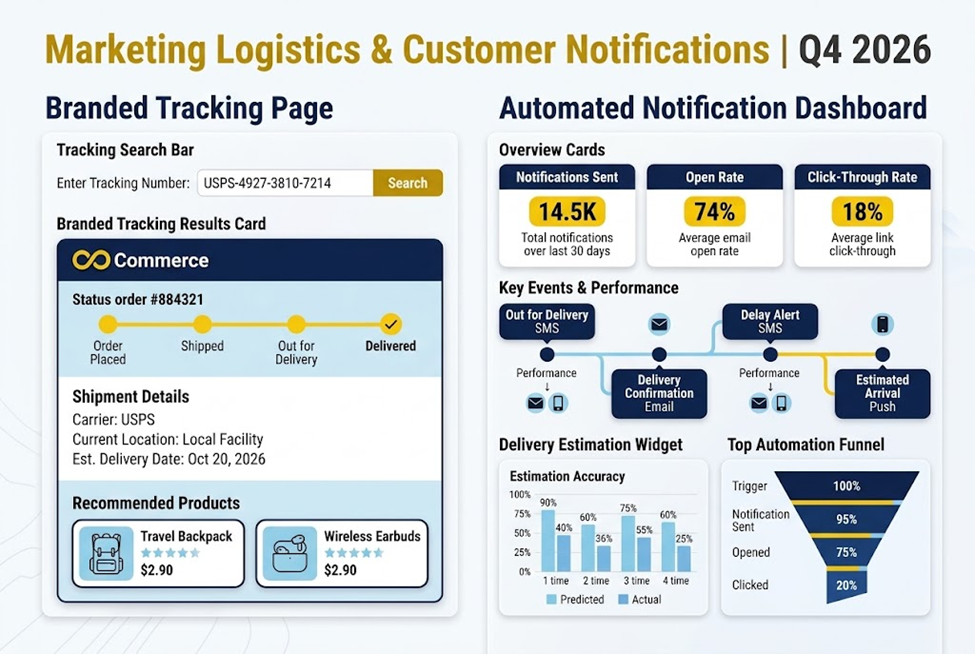
Labels get a parcel moving, but tracking is what customers see afterward. AfterShip Order Tracking is listed as a “Built for Shopify” app that creates a branded order tracking page and sends automated shipment notifications across 1,100+ carriers. The listing also mentions automated email and SMS notifications, a dashboard for tracking status and exceptions, analytics and an AI-powered estimated delivery date widget for product and checkout pages. It offers 24/7 support by chat or email.
Pricing (as listed, billed every 30 days in USD): Free for 50 shipments a month; Essentials $11 a month for 100 shipments plus $0.08 per extra shipment; Premium $70 a month for 500 shipments plus $0.12 per extra shipment. Paid plans list a 7-day free trial and a $1 first-month offer.
Reputation: 4.6 out of 5 from 1,502 reviews. The listing shows one review alleging that over-quota charges continued after cancellation and that cancelling was difficult; AfterShip responded by inviting the reviewer to contact support. Check your quota and billing settings after installing.
Best for: stores that already have labels and carriers sorted and want better post-purchase communication.
Consider: this is a tracking tool, not a label tool, so it complements the apps above rather than replacing them.
Best for complex rates at checkout and freight: ShipperHQ
If your problem is what shoppers see at checkout, not label printing, ShipperHQ is aimed at that. It is described as a “no-code shipping and checkout app” with rates from 100+ parcel and LTL freight carriers.
Listed features:
- Dimensional shipping that optimizes box and pallet selection.
- LTL freight quotes that include oversized fees, fuel surcharges and accessorials.
- Shipping rules for discounts, surcharges, free shipping and restrictions by product, zone or segment.
- Estimated delivery dates based on lead times, cutoffs and blackout dates.
- Split shipments for multi-location inventory, a product page shipping calculator, local pickup and address validation.
Pricing (as listed, billed every 30 days): Essentials $75 a month (2 carriers, 5 rules, 1 origin, 200 orders a month), Standard $350 (4 carriers, 20 rules, 4 origins, 1K orders) and Advanced $600 (6 carriers, 50 rules, 8 origins, 2K orders). All plans list a 15-day free trial.
Reputation: 4.8 out of 5 from 74 reviews, a smaller sample than the others.
Best for: stores with heavy, oversized or freight products, many shipping zones or complex rules.
Consider: this is the most expensive tool here, and it is built for a specific problem. Most small stores do not need it.
Side-by-side summary
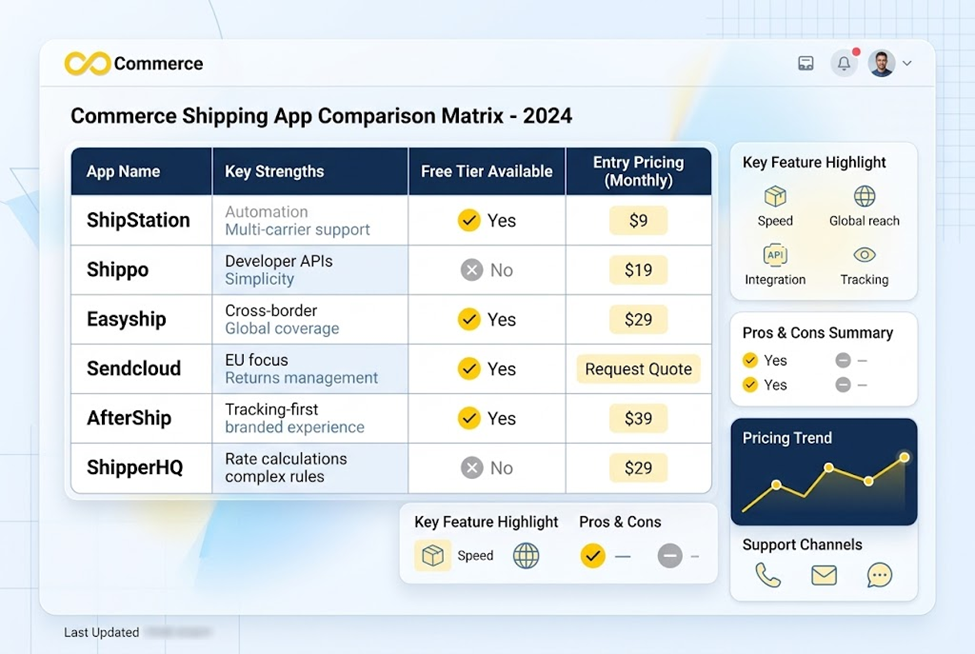
| App | Strength | Free option | Entry paid price (as listed) | Trial (as listed) |
| Shopify Shipping | Built-in labels | Included with Shopify | Check your plan | n/a |
| ShipStation | Multi-channel, automation | No free plan listed | $14.99/mo | 30 days |
| Shippo | Simple labels | Yes (30 labels/mo) | $19/mo | 30 days |
| Easyship | International, duties | Yes (50 shipments/mo) | $29/mo | 14 days |
| Sendcloud | European carriers | Yes | $40/mo plus per-label fee | 14 days |
| AfterShip | Tracking | Yes (50 shipments/mo) | $11/mo | 7 days |
| ShipperHQ | Checkout rates, freight | No | $75/mo | 15 days |
All figures come from the apps’ own listings on 2026-10-14. Re-check before publishing or buying.
Match the app to your situation
- New store, few orders: start with Shopify Shipping, and look at a free tier such as Shippo’s or Easyship’s only if you see a gap.
- Selling on several channels: compare ShipStation with the others for order sync and automation.
- Shipping to many countries: put Easyship near the top of your list and test customs data.
- Shipping in Europe: look at Sendcloud for carrier choice and delivery options.
- Lots of support emails about tracking: add AfterShip or a similar tracking tool.
- Heavy items or complicated rates: look at ShipperHQ or carrier-calculated shipping.
Test before you commit
Use the trial period properly:
- Install the app on your live store, or a development store if you have one.
- Run five real or realistic orders through it, including one international and one heavy one if relevant.
- Compare label prices with what Shopify Shipping would charge for the same parcels.
- Check that tracking numbers reach customers and appear in your Shopify admin.
- Read the billing section and the first invoice carefully.
- Contact support with a question to see how quickly you get a human reply.
Shipping information and your product feeds
Shipping costs and delivery speed influence whether a shopper buys, and they also appear in the places you advertise. If you list products on Bing and Microsoft shopping ads, the shipping details in your shipping app, your Shopify settings and your shopping program account should agree, or you risk showing a price or delivery promise that does not match your checkout.
Infinite Commerce’s Microsoft Shopping Feed app is a Shopify app that generates and syncs a Microsoft Shopping product feed from your store. According to its Shopify App Store listing, it generates the feed on install with no attribute mapping, keeps listings synchronized, supports multiple languages and currencies, and works with Microsoft Merchant Center. The listing shows a Free plan for 100 products and paid plans from $9.99 a month, with a 7-day trial on paid plans. The listing does not say it manages shipping settings, so set up shipping in your Merchant Center account separately and check it against your Shopify rates.
Common mistakes
- Buying for features you will not use. Start with your real gap.
- Ignoring per-label and overage fees. A cheap plan can cost more at volume.
- Not testing customs data. International shipments depend on accurate product details.
- Showing the wrong rates at checkout. Mismatched rates cause lost orders or lost margin.
- Forgetting returns. Check how each app handles return labels in your country.
- Installing overlapping apps. Two tools doing the same job can create duplicate notifications or conflicting rates.
Final thoughts
Start with what Shopify gives you, name the gap, and pick the app built for that gap. Use the free trials to run real orders, read the billing terms and compare the real cost at your order volume, not the headline price. Revisit the choice when your volume, channels or countries change.
Keep your product data consistent across channels
Shipping is one part of getting orders out the door; accurate product data is another. Infinite Commerce’s Microsoft Shopping Feed app syncs your Shopify products to Microsoft Merchant Center for Bing and shopping ads, with a 7-day trial on paid plans. If you want help checking your feed or planning your setup, contact our team.
FAQs
There is no single best one. Shopify Shipping covers basic discounted labels. ShipStation suits multi-channel automation, Easyship international duties, Sendcloud European carriers, AfterShip tracking and ShipperHQ complex checkout rates.
Not always. Shopify’s built-in shipping tools let you buy and print discounted labels and track deliveries. Add an app when you have a specific gap, such as multiple channels or international duties.
Yes, with carrier-calculated shipping. Shopify says it is available on Advanced and Plus, and that Grow stores can add it for an extra fee or by switching to annual billing.
Several have free tiers with limits, including Shippo (up to 30 labels a month), Easyship (50 shipments a month), AfterShip (50 shipments a month) and a free Sendcloud plan, as listed. Limits and terms change, so check each listing.
Use a tool that calculates landed cost at checkout, such as Easyship’s DDP option, or Shopify’s settings for charging customs fees upfront. Test with real products and destinations.
It depends on how the app works. Test your store’s speed before and after installing, and remove apps you do not use.
