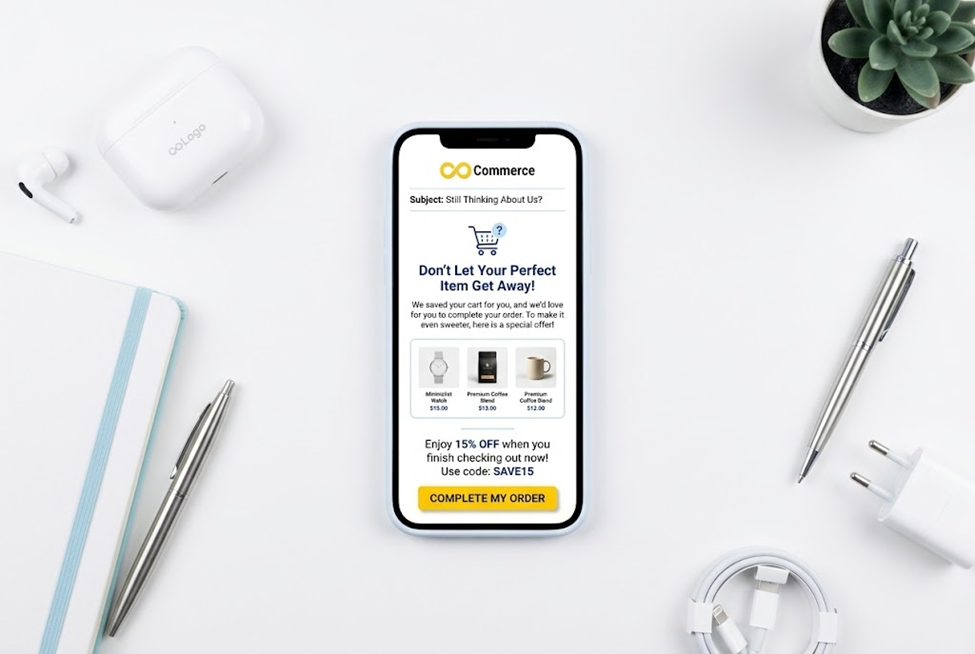
 Amber Naz
Quick Summary
An abandoned cart email is a short message that goes to a shopper who started checkout and did not finish. Done well, it feels like a helpful nudge from a store that remembers you. Done badly, it feels like a nagging robot with a coupon. The difference is almost always in the wording, the timing and whether the email tells the truth.
This guide gives you copy-ready templates you can paste into Shopify’s abandoned checkout email, Klaviyo or any other email tool, with subject line options, preview text, timing suggestions and notes on when to use each one. It draws on Shopify’s help documentation, Klaviyo’s help center, the US Federal Trade Commission’s CAN-SPAM guide and Infinite Commerce’s own article on Facebook ads. It does not quote open rates, recovery rates or revenue figures, because those vary by store and no figure in this article comes from a verified primary source. Treat every timing and subject line here as a starting point to test, not a proven winner.
Quick answer
- Send a short sequence, not a single email. A common starting structure is a gentle reminder, a helpful follow-up and a final message, with an optional incentive.
- Match each email to a reason the shopper left: forgot, got distracted, had a question, was unsure about cost, or wanted to compare.
- Show the cart. Include the product image, name, price and a clear button back to checkout.
- Be honest. Do not invent scarcity, deadlines or discounts you will not honor.
- Test one change at a time, and measure orders recovered, not just opens.
How abandoned checkout emails work on Shopify
Before the templates, a few facts about the mechanics, from Shopify’s help documentation.
- A checkout counts as abandoned when it stays incomplete for more than ten minutes after the customer has given their email address.
- To turn on automatic emails, go to Apps, then Messaging, then Automations, open the abandoned checkout automation, choose Edit settings, select the option to send abandoned checkout emails automatically and save.
- A Send after setting controls how long after abandonment the email goes, and a Send to setting chooses which visitor category receives it. The page does not list the available options, so check your own admin.
- Customize email lets you edit the abandoned checkout notification template, including a logo and color scheme.
- The page describes the legacy experience and points to Shopify Messaging automation as the newer option, so your admin may look different.
Shopify also lists the cases where no email is sent: the customer completes a sale first, a payment processing error occurred, you do not ship to that address, the customer entered a phone number instead of an email, nothing in the checkout is available, all products are free with no shipping fee, or Shopify Payments blocked the payment as high risk. If you use an email platform such as Klaviyo, its flow is triggered by its own events instead, and Klaviyo’s help center lists Started Checkout or Added to Cart as the metrics for an abandoned cart flow.
Note on the placeholders in the templates below: each tool writes variables differently. The templates use plain brackets, such as [First name] and [Product name]. Swap them for your platform’s own dynamic variables. Klaviyo’s help center warns that event variables are case-sensitive and must match the preview exactly, and that for multiple cart items you need a repeat or dynamic table feature, so test with a multi-item cart.
Suggested sequence and timing
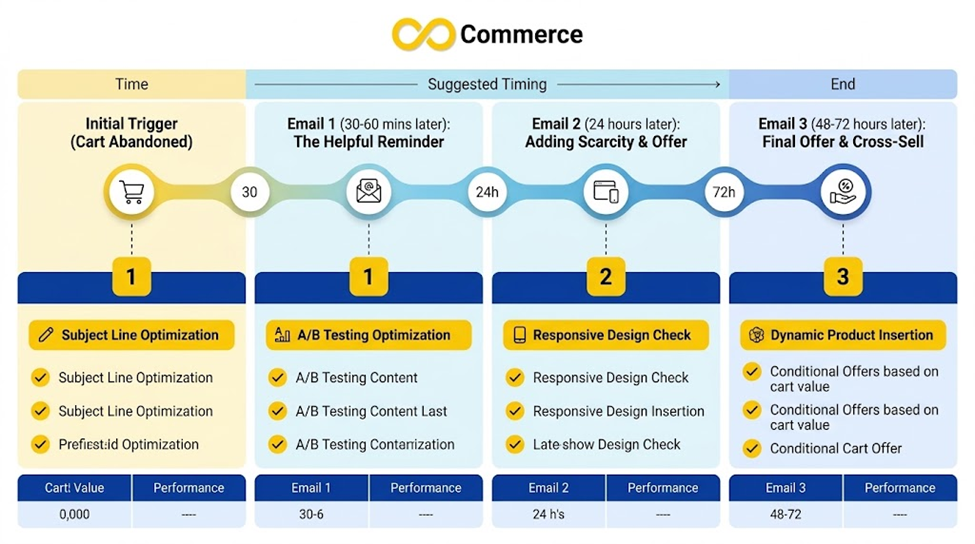
Shopify’s page does not state recommended delays, so the timings below are a starting hypothesis for you to test.
| Purpose | Suggested timing to test | Incentive? | |
| 1. Simple reminder | Recover the forgetful or distracted | Within a few hours | No |
| 2. Help and answers | Remove doubts | About a day later | No |
| 3. Social proof | Build trust | One to two days after that | No |
| 4. Last call or incentive | Final nudge | Two to three days after the previous email | Optional |
Keep the whole sequence short. If a shopper buys at any point, they should leave the flow immediately, so they never receive a reminder for something they already bought.
Template 1: The simple reminder
When to use: first email, shortly after abandonment.
Goal: a friendly nudge. No pressure, no discount.
Subject line options:
- You left something in your cart
- Still thinking it over?
- Your cart is saved
- [First name], your [Product name] is waiting
Preview text options:
- We saved your items so you can pick up where you left off.
- It only takes a minute to finish checking out.
Email body:
Hi [First name],
Looks like you left something behind. We’ve saved your cart so you can finish whenever you’re ready.
[Product image] [Product name] – [Variant] Quantity: [Quantity] [Price]
[Button: Return to your cart]
If you ran into a problem at checkout or have a question, just reply to this email and a real person will help.
Thanks, [Store name]
Why it works: it shows the cart, offers one clear action and invites a reply. It does not pretend anything is urgent.
Template 2: The helpful follow-up
When to use: second email, about a day later. Goal: answer the questions that stop people buying.
Subject line options:
- Questions about your order?
- Need a hand with [Product name]?
- Here’s what you need to know before you buy
Preview text options:
- Shipping, returns and sizing, all in one place.
- We’re happy to help if something’s unclear.
Email body:
Hi [First name],
Choosing the right product can take a moment, so here are the answers we get asked most often.
Shipping: [Your shipping times and costs, stated accurately] Returns: [Your returns policy in one sentence] Sizing or fit: [A short, useful tip, or a link to your guide]
[Product image] [Product name] – [Price]
[Button: Finish your order]
Still unsure? Reply to this email and tell us what you’re looking for.
[Store name] team
Why it works: most abandoned carts are not lost to a lack of coupons but to unanswered questions. Only include facts that are true and up to date. If you are not sure of your delivery time, check it before you write it.
Template 3: The social proof email
When to use: third email.
Goal: reassure with real customer experience.
Subject line options:
- See why customers love [Product name]
- What others are saying
- Still deciding? Here’s what customers told us
Preview text options:
- Real reviews from real customers.
Email body:
Hi [First name],
Still on the fence about [Product name]? Here’s what some of our customers have said.
“[Genuine customer review quote]” – [Customer first name] “[Another genuine quote]” – [Customer first name]
[Product image] [Product name] – [Price]
[Button: Take another look]
Questions? We’re here to help.
[Store name]
Important: use real reviews only, with permission where required. Never write fake testimonials or invent customer names. Reviews quoted in marketing may also fall under advertising rules in your country, so check what applies.
Template 4: The low-stock email (only if true)
When to use: when a product genuinely has limited stock.
Goal: a fair heads-up, not manufactured panic.
Subject line options:
- Heads up: [Product name] is running low
- Only [number] left of [Product name]
Preview text options:
- We wanted you to know before it sells out.
Email body:
Hi [First name],
A quick heads-up: the [Product name] in your cart is running low on stock, and we can’t guarantee it will be here later.
[Product image] [Product name] – [Variant] – [Price]
[Button: Complete your order]
Thanks for shopping with us. [Store name]
Why it needs care: do not use this template unless the stock level is real and your system pulls the live number. A false “only 2 left” message damages trust and can be treated as a misleading claim. If you cannot show live stock, skip it.
Template 5: The incentive email
When to use: a later email, if you choose to offer a discount.
Goal: give hesitant shoppers a reason to finish.
Subject line options:
- A little something to help you decide
- [Discount] off your cart, just for you
- Your discount is inside
Preview text options:
- Use your code at checkout before it expires.
Email body:
Hi [First name],
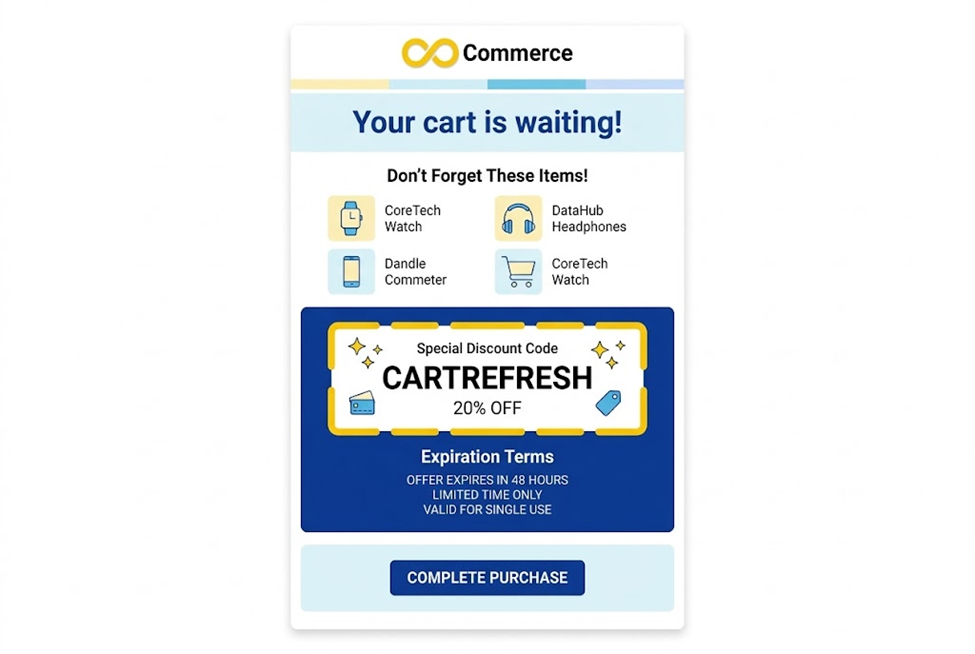
We’d love for you to enjoy [Product name], so here’s [discount description] on your order.
Your code: [CODE] [Honest terms, such as the expiry date and any minimum order]
[Product image] [Product name] – [Price]
[Button: Use my code]
[Store name]
Before you use it:
- Shopify’s discount codes page lists four types: a monetary value discount, a percentage discount, buy X get Y and free shipping. It also says a discount reduces the subtotal before taxes. The page did not document limits such as expiry dates, usage caps or minimums, so check those options in your admin and state the real terms in the email.
- Decide your rules before you automate. If every abandoner gets a code, shoppers may learn to abandon on purpose. Consider keeping the incentive for later in the sequence or for higher-value carts, and measure whether it is worth the margin.
- Free shipping is often a gentler incentive than a percentage off.
- If you advertise an expiry, honor it. Reusing an “expired” code destroys credibility.
Template 6: The final reminder
When to use: the last email in the sequence.
Goal: close the loop politely and leave the door open.
Subject line options:
- Last reminder about your cart
- We’re clearing your cart soon
- Still want your [Product name]?
Preview text options:
- We won’t keep emailing, but your cart is here if you want it.
Email body:
Hi [First name],
This is our last note about the items in your cart. If you’re still interested, they’re one click away.
[Product image] [Product name] – [Price]
[Button: Go to my cart]
If you’ve changed your mind, no problem. Thanks for stopping by, and we hope to see you again.
[Store name]
Only say the cart will be cleared if that is true. Shopify’s page notes that items in the cart are not saved after abandonment in the legacy experience, so check what actually happens in your setup before you promise anything.
Subject line ideas by approach
Use these as a swipe file. Rotate, test and keep the ones that fit your voice.
| Approach | Examples |
| Plain and direct | You left something in your cart; Your cart is waiting |
| Friendly | Still thinking it over?; Need a hand with your order? |
| Personal | [First name], you forgot something; [First name], your [Product name] is saved |
| Helpful | Questions about [Product name]?; Shipping and returns, answered |
| Benefit-led | Ready when you are: [Product name] |
| Incentive (if offered) | A little something to help you decide |
Rules for subject lines:
- Make them accurate. The FTC’s CAN-SPAM guide says subject lines must not be deceptive and must accurately reflect the message content, which applies to commercial email.
- Avoid fake “Re:” or “Fwd:” prefixes, and avoid claiming an order was placed when it was not.
- Keep them short enough to read on a phone.
- Test one variable at a time, such as plain versus personal.
What to include in every abandoned cart email
- The product, with image, name, variant and price.
- One main button back to the cart or checkout.
- A short, human voice that sounds like your brand.
- Easy contact, such as a reply-to address that is monitored.
- Your policies, especially shipping and returns, where relevant.
- Mobile-friendly layout. Check every email on a phone.
- Required compliance details, discussed next.
Legal basics to check
This section is general information, not legal advice. Ask a qualified professional about your situation and your countries.
The FTC’s CAN-SPAM compliance guide sets out these requirements for commercial email in the United States:
- Accurate From, To and Reply-To information that identifies the sender.
- Non-deceptive subject lines.
- A clear disclosure that the message is an advertisement, where it is one.
- A valid physical postal address.
- A clear way to opt out, honored within 10 business days, with no fee or extra personal information required.
The guide says messages whose primary purpose is transactional or relationship are exempt from most provisions, and that mixed messages are treated as commercial in certain cases. Whether a particular abandoned cart email counts as commercial can depend on its content, so do not assume it is exempt. Other countries and regions have their own rules on consent and marketing emails, and SMS has its own rules. If you sell internationally, check each market.
Personalization without being creepy
Personalization helps when it makes the email more useful, not when it shows how much you know.
- Good: the actual product they left, in the right size and color.
- Good: their first name, if you have it and it is reliable.
- Risky: quoting browsing details they did not expect you to track.
- Avoid: guessing their circumstances.
If your email platform pulls event data into the message, test with multi-item carts and with missing data, so you never send “Hi ,” with a blank name.
Measure what matters
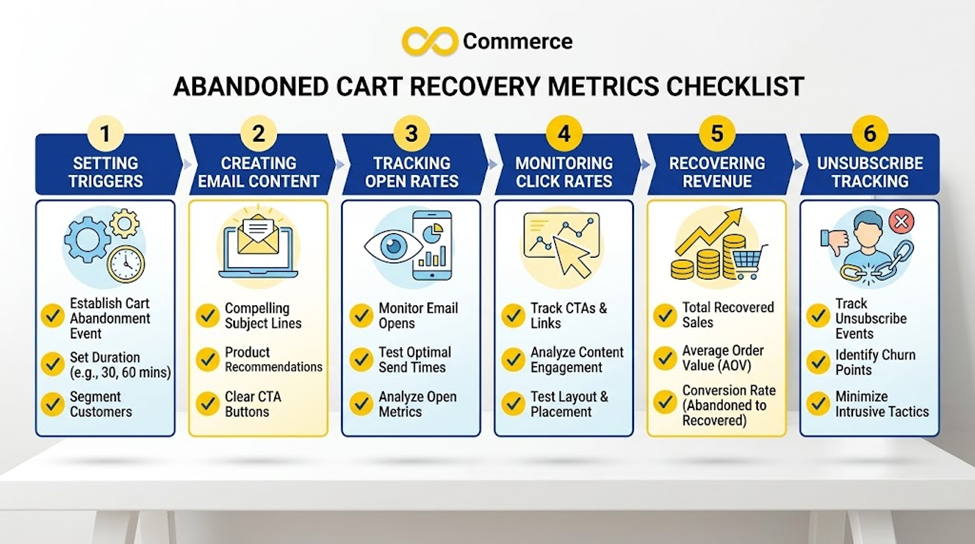
Opens alone do not tell you whether the emails work. Track:
- Recovered orders from the flow, and their value.
- Click rate on the cart button.
- Unsubscribe and complaint rates. If these rise, your sequence is too aggressive.
- Revenue per recipient, rather than only per email.
- Discount cost, if you use incentives.
Compare against a holdout group that receives no emails if your platform allows it. Some shoppers would have returned anyway, and a holdout shows what the emails add.
Pair email with retargeting ads
Email reaches shoppers who gave you their address. Ads can reach others who showed intent. Infinite Commerce’s own guide to Facebook ads for your Shopify store suggests cart abandoners from the last 7 days as a retargeting audience, and recommends excluding recent buyers from ads. The article also states several performance figures without sources, so this guide does not repeat them. The sensible takeaway is coordination: if a shopper is in your email sequence and your retargeting audience, make sure they do not see conflicting offers, and stop both once they buy.
Common mistakes
- Sending too many emails. A long chain feels like pressure.
- Leading with a discount. Start with a reminder and help.
- Fake urgency. False countdowns and stock claims break trust and may be unlawful.
- A broken cart link. Test the link on desktop and phone, logged in and logged out.
- Still emailing after purchase. Exit buyers from the flow.
- Ignoring plain-text and mobile views. Many people read on small screens.
- Not testing multi-item carts. Variables often break there.
- No monitoring of replies. An invitation to reply needs someone to answer.
Final thoughts
The best abandoned cart emails are the ones a shopper would not mind receiving: short, accurate, helpful and easy to act on. Start with the simple reminder, add a helpful follow-up, use social proof and incentives carefully, and measure recovered orders instead of opens. Then change one thing at a time.
Need help with your Shopify tracking and ads?
Abandoned cart emails work best alongside accurate tracking and coordinated ads. If you want a hand with your Shopify tracking, ad setup or the data behind your flows, read Infinite Commerce’s guide to Facebook ads for Shopify or contact our team.
FAQs
Remind the shopper what they left, show the product, give one clear way back to checkout and offer help. Keep it short, accurate and in your brand’s voice.
Many stores start with a short sequence of two to four emails and test from there. Shopify’s documentation does not specify a number, so use your own data to decide.
Shopify counts a checkout as abandoned after ten minutes of inactivity once the customer has provided an email address, and the Send after setting controls the delay. Test a short delay of a few hours against a longer one.
It is optional. Test a sequence with no discount against one that offers a code late in the flow, and compare recovered revenue after the discount cost.
For marketing emails in the US, the CAN-SPAM guide requires an opt-out mechanism and a physical address. Whether an abandoned cart email is commercial can depend on its content, so ask a legal professional.
Yes, as a starting point. Replace the bracketed placeholders, add your real policies and test the emails on your platform before they go live.
